Instagram keyword automation: how to pick trigger words that actually fire
Contents
Instagram keyword automation sends a DM to anyone who comments a chosen word, such as price, under your post or Reel. Whether it fires depends less on the tool than on the word: how the tool compares it with the comment, which forms people actually type, and which other words happen to contain it. This guide shows how the matching works and how to pick trigger words that catch the right people.
Keywords are one piece of the setup. If you have not built the automation yet, start with the comment-to-DM automation guide, which walks through the whole chain from connecting the account to the first message.
What a keyword trigger is and where it listens
A keyword trigger is a rule: when a new comment or message contains one of your words, run this automation. The automation then sends a private reply in Direct, and optionally a public reply under the comment. Meta allows one private reply per comment (Meta docs), so that first message is short and ends with a button; the link follows after the tap.
Most tools let the same word listen in more than one place. GetChat has three trigger cards for it:
- On comment (post / Reels) listens to comments under one chosen post or under all posts.
- Direct — keyword listens to direct messages, for people who write to you instead of commenting.
- Comment + Direct catches the word in either place with one automation and one reply.
The rules below apply to all three. The only difference is where the text comes from.
Contains vs exact match: what actually gets compared
Tools offer two modes, under different names. Contains (sometimes called partial or broad) looks for your keyword as a piece of text anywhere in the comment. Exact match fires only when the whole comment is the keyword and nothing else.
In GetChat, contains is the default and exact is a checkbox labeled Exact match. Both the comment and your keywords are lowercased first, so PRICE, Price and price are the same. In exact mode only spaces at the ends are trimmed, so a question mark, an emoji or a tagged friend makes the comment a different string.
What happens to the keyword price in each mode
| Comment | Contains | Exact match |
|---|---|---|
| PRICE | fires | fires |
| what's the price? | fires | no: other words around it |
| Price! | fires | no: the exclamation mark is part of the text |
| @jess.k price | fires | no: the tag is part of the text |
| prices please | fires: "prices" contains "price" | no |
| pricing? | no: "pricing" does not contain "price" | no |
| how much is it | no: different words | no |
The last two rows are where most "it only answers some people" complaints come from. The keyword was fine; people just typed something else. Contains is the right default for almost every post. Exact match is for codes you would never want caught inside a sentence, like 1 or +.
English word forms: plurals, families and synonyms
English is kind to contains matching, with a few exceptions. A regular plural adds letters at the end, so the singular sits inside it: guide catches "guides", link catches "links" and "linked". The exceptions are words where the ending replaces a letter, and the synonyms people use instead of your word.
- The "-e" drop.
pricemisses "pricing" (the e disappears), although it does catch "prices" and "priced". Addpricingas its own keyword, or use the stempric. - Irregular forms.
buymisses "bought",sizemisses "sizing". Add the forms your audience writes. - US and UK spelling.
colormisses "colour", andcataloguemisses "catalog". If you have buyers on both sides of the Atlantic, add both spellings, or use the one that sits inside the other:catalogalready catches "catalogue". - Synonyms. People who want a price write "cost", "rates" or "how much". Add
costandratesas their own keywords. "How much" is harder: the wizard splits it into two words, andmuchalone also fires on "thanks so much". Naming your keyword in the caption works better than chasing every phrasing.
A stem like pric catches price, prices, pricing and priced in one entry, but stems carry a cost. The shorter the stem, the more unrelated words contain it. "Apricot" contains pric too, which matters if you sell food. A stem works when it is long and rare; for short words, list the forms instead.
Words that hide inside other words
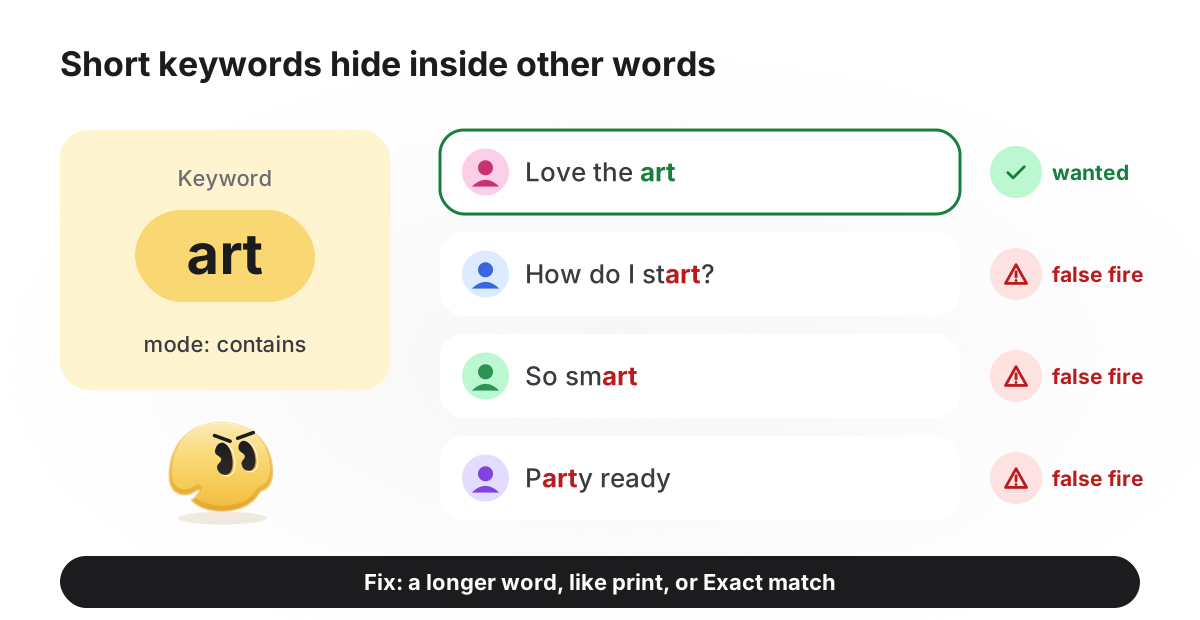
Contains matching does not know where a word starts or ends. It only checks whether the letters appear in a row. Short keywords therefore fire on comments that have nothing to do with your offer.
Common trigger words and how they misbehave in contains mode
| Keyword | What goes wrong | Better |
|---|---|---|
yes | Sits inside "eyes": "those eyes!" gets your offer | A word tied to the offer: guide, recipe |
me | Inside "message", "time", "awesome", "some" | Never use two-letter keywords in contains mode |
art | Inside "start", "smart", "party" | print, poster, or the artwork's name |
info | Also fires on "information" and "infographic" | Fine when those comments want the same answer |
link | Fires on "the link doesn't work" | Fine, if the answer to that complaint is the link anyway |
1 or + | Inside "10/10", "1+1", prices and dates | Only with Exact match |
free | Fires on "is shipping free?" and "carefree" | freebie, or a word naming the gift |
The rule of thumb: pick a word of five letters or more, tied to what the person receives, and rare in your usual comments. Then name it in the caption or on the Reel, for example "Comment guide and I'll DM it to you". The clearer the instruction, the fewer variants you need to catch; for Reels, where to show and say the keyword matters as much as the word itself.
pricing next to price, and this comment now gets an answer- CommentWhat's your pricing for a two-tier cake?
- Public replySent you the details in DM
- DMHi! Our cake menu with sizes and prices is ready. Tap below and I'll send it. [Button: "Send the menu"]
Keyword ideas by niche
Landing pages promise "the best keywords" and rarely list any. The table below is a starting point, not a result: each keyword is chosen to name what the person gets and to avoid the hidden-word traps above. Swap in your own product names.
Starter keywords by goal (illustrative; test them against your own comments)
| Goal | Keywords that tend to work | Avoid, and why |
|---|---|---|
| Shop: details of one product | catalog, sizes, the product's name (jacket) | price alone: also fires on "price is too high"; add pricing and cost if you keep it |
| Creator: free guide or template | guide, checklist, recipe, preset | link: also fires on "linkedin" |
| Course or webinar | webinar, syllabus, waitlist | course: fires on "of course" |
| Salon, studio or clinic booking | booking, appointment, schedule | book: fires on "facebook" and "notebook" |
| Café or restaurant | menu, reserve | table: fires on "comfortable" |
| Giveaway | giveaway, or the prize's name | win and enter: inside "window", "twins", "center" |
Traps the settings screen does not show
None of these breaks an automation, but each quietly loses some of the people who comment. Check them once during setup.
- Phrases become separate words. In GetChat a space, a comma or Enter turns what you typed into its own keyword. "send link" becomes
sendandlink, and the automation then answers every comment that contains "send". Enter one word at a time. - Punctuation inside the keyword. A keyword like
what'sneeds the same apostrophe the commenter's keyboard produces, and phones often type a curly one. Keep punctuation out of keywords. - Look-alike letters. Some letters in other alphabets look identical to Latin ones but are different characters (Unicode keeps a list of these confusables). A keyword pasted from a design file or a translated document can contain one and never match, because GetChat compares characters, not shapes. Type keywords by hand.
- Emoji. The same emoji can be stored in more than one way: a heart with or without an invisible variation selector, a hand with or without a skin-tone modifier. Matching on emoji is unreliable, and emoji are a common reaction to any post anyway. Use a word.
- Exact match and tags. People often tag a friend in the same comment. With exact match on, "@sam guide" no longer equals
guide. Turn exact match on only for short codes that need it.
Several automations, several keywords: which one answers
One comment can match more than one automation, for example a general one on all posts and a specific one made for a launch. Instagram allows only one private reply per comment, so the tool has to choose. In GetChat each comment runs exactly one automation, picked by how narrowly it is aimed.
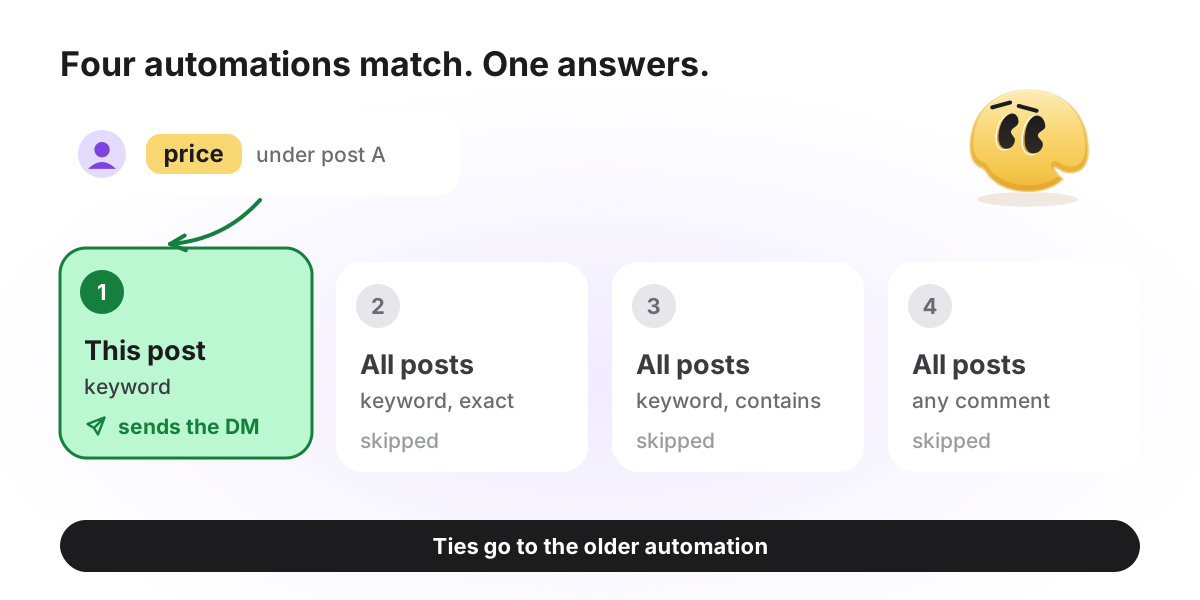
- An automation bound to this post beats one that runs on all posts.
- An automation with keywords beats one that answers any comment.
- Exact match beats contains.
- When everything else is equal, the one created earlier answers.
That gives a clean structure: one general automation on all posts with everyday words like price and pricing, plus a dedicated automation for each post that needs its own word and its own reply. The dedicated one takes the comments under its post, and the general one keeps answering everywhere else.
Repeat comments follow the same logic. By default every new matching comment gets its own reply, so a person who types your keyword twice gets two DMs. The Only once toggle limits an automation to one reply per person: their next comment skips it, and the next matching automation in the order answers, if there is one. On an all-posts automation that also means silence for that person under your other posts, so keep Only once for automations tied to one post.
Where the keywords go in GetChat
The full walkthrough, from connecting the account to the first message, is in the comment-to-DM guide. These are the steps that decide what fires:
Pick where the word listens
Under New automation → Quick triggers, choose On comment (post / Reels), Direct — keyword, or Comment + Direct for both.
Choose the post
On the Account step, under Which post?, select one post or All posts. A post-bound automation outranks an all-posts one on its own post.
Enter the keywords
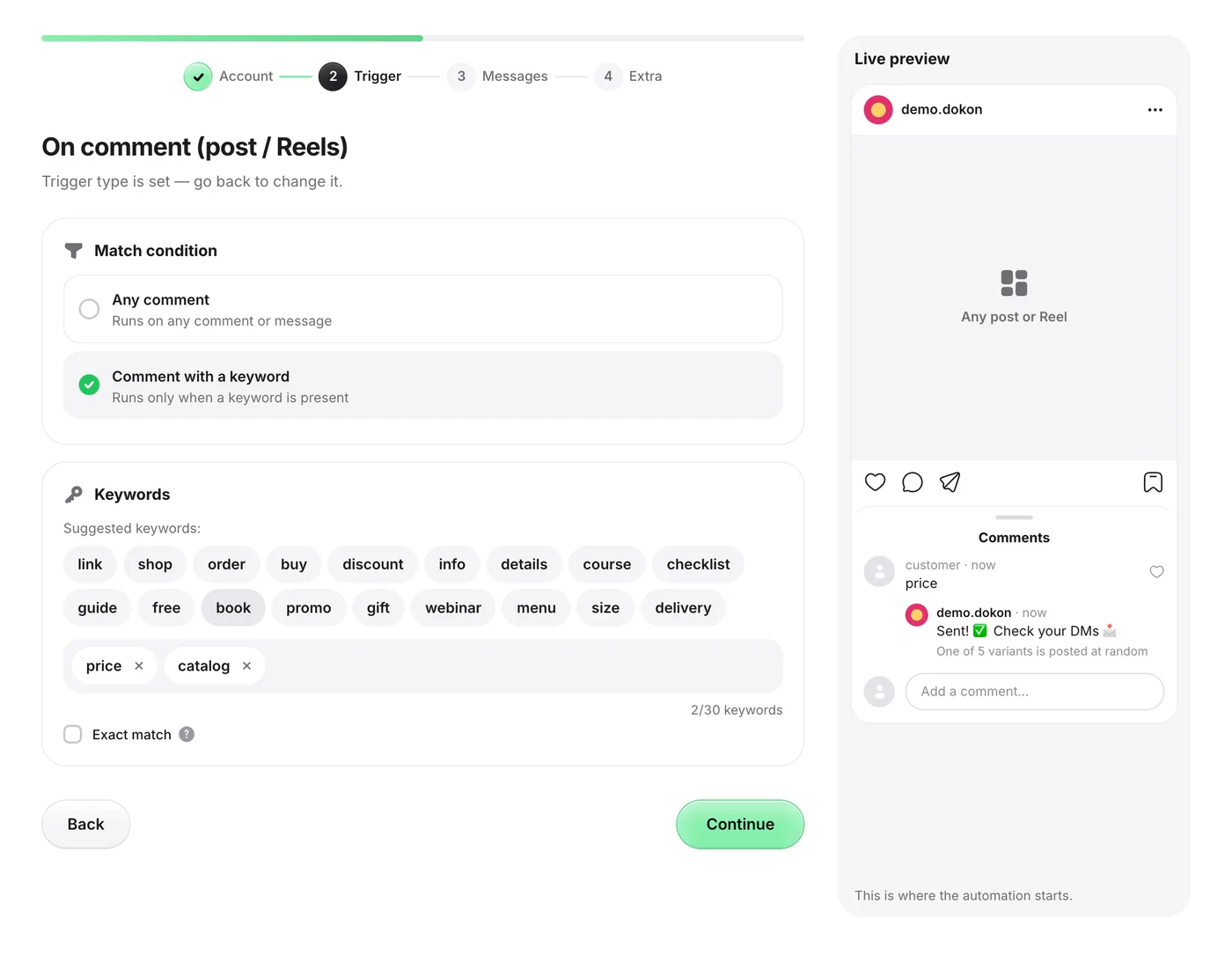
On the Trigger step, choose Comment with a keyword and type the words one at a time. Each becomes a chip, and a counter shows how many of the 30 you have used.
Decide on exact match
Leave Exact match unchecked to catch the word inside a sentence. Check it only for short codes.
How to test a keyword before you rely on it
Five minutes of checking saves a day of "I commented and got nothing."
- Write down eight to ten comments the way real people would type them: with plurals, a question, a typo, a tagged friend.
- Check that each one contains at least one of your keywords as an unbroken run of letters. If not, add the missing form.
- Write down five ordinary comments from your recent posts, such as compliments or shipping questions, and check that none of them contains a keyword by accident.
- Leave a test comment from a second account. GetChat ignores comments from the connected account itself, so a test from your own profile never fires.
- A day later, open Analytics → Activity log to see who received a message and when.
If the keyword is right and the message still does not arrive, the cause is usually elsewhere: Instagram's limits, message access switched off, or the one-reply rule. The guide on a keyword not firing goes through it symptom by symptom.
Frequently asked questions
What is Instagram keyword automation?
A rule that watches comments or direct messages for words you choose and sends an automatic DM when one appears. It runs through Instagram's official API, which allows one private reply per comment.
Why does my automation reply to some people and not others?
Usually the person typed a different form of the word, such as "pricing" instead of price. Less often exact match is on and the comment has a question mark, an emoji or a tag. Add the missing forms and check the mode.
Do capital letters matter?
Not in GetChat. Both the comment and your keywords are lowercased before they are compared, so "PRICE" and price match.
How many keywords can one automation have?
In GetChat, up to 30 per automation. Any one of them is enough to fire it.
Can I stop the automation from replying to certain words?
GetChat has no exclusion list. To avoid false triggers, choose a longer, rarer keyword or switch on exact match.
Does a comment keyword also work in DMs?
The comment trigger only listens to comments. Use Direct — keyword for messages, or Comment + Direct to catch the word in both places with one automation.
Sources
Keep reading
Instagram comment-to-DM automation: the complete guide (with Meta's actual rules)
The whole comment-to-DM chain on one page: Meta's rules with sources, the setup, the viral-day limit and what not to automate.
Comment for the link: sending links from Instagram Reel comments to DMs
"Comment for the link" on Reels: where to show the keyword, link buttons with UTM tags, PDF lead magnets and per-Reel numbers.